

Organization Chart
What it is for
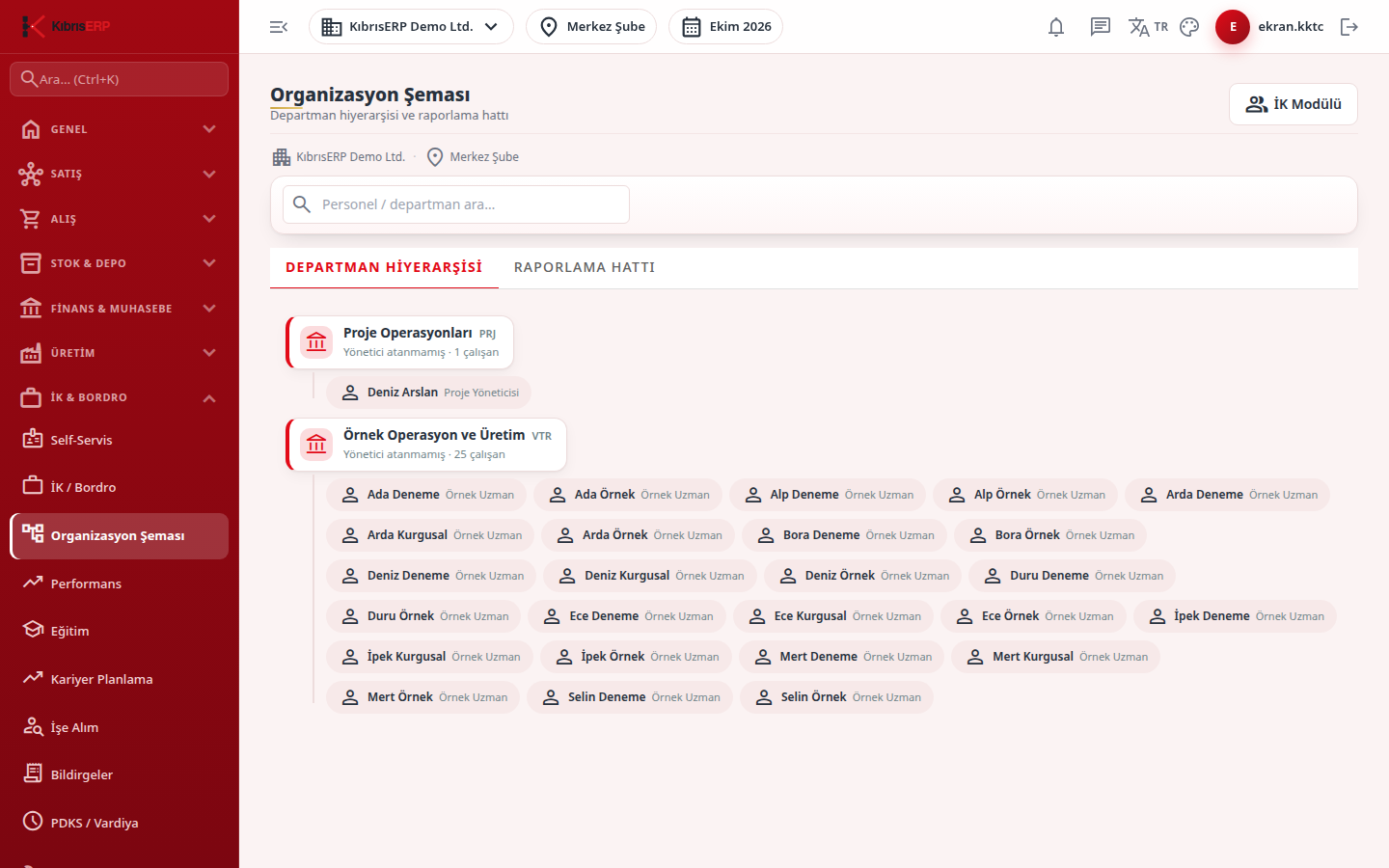
Section titled “What it is for”The Organization Chart (Organizasyon Şeması) shows your company’s structure as two trees: the Department Hierarchy (departments, sub-departments and their members) and the Reporting Line (who reports to whom). No data is entered on the screen; the tree is built from the department, position and manager assignments on the Organization tab of HR. Clicking a person or node opens a Personnel Card summary below.
Who uses it
Section titled “Who uses it”HR officers and managers. On the Human Resources page of the role screen, View shows the whole company and Manager View shows only the team you manage (a note “Team view: only the team/department you manage is shown” appears at the top). Email and phone are visible only to those with the Personal Data permission.
Screens
Section titled “Screens”- Department Hierarchy (Departman Hiyerarşisi)
- Reporting Line (Raporlama Hattı)
- Search box: type a name, code, position or department to narrow the tree; the branch of a matching node is kept so the hierarchy is not broken.
- Personnel Card summary: code, position, department, manager and status; click the same person again to close it, and the card’s button opens the HR screen.
- HR Module button at the top right.
Related modules
Section titled “Related modules”Step-by-step screen guides are currently available in Turkish; the links above open them.