

Marine Legal Rules
What it is for
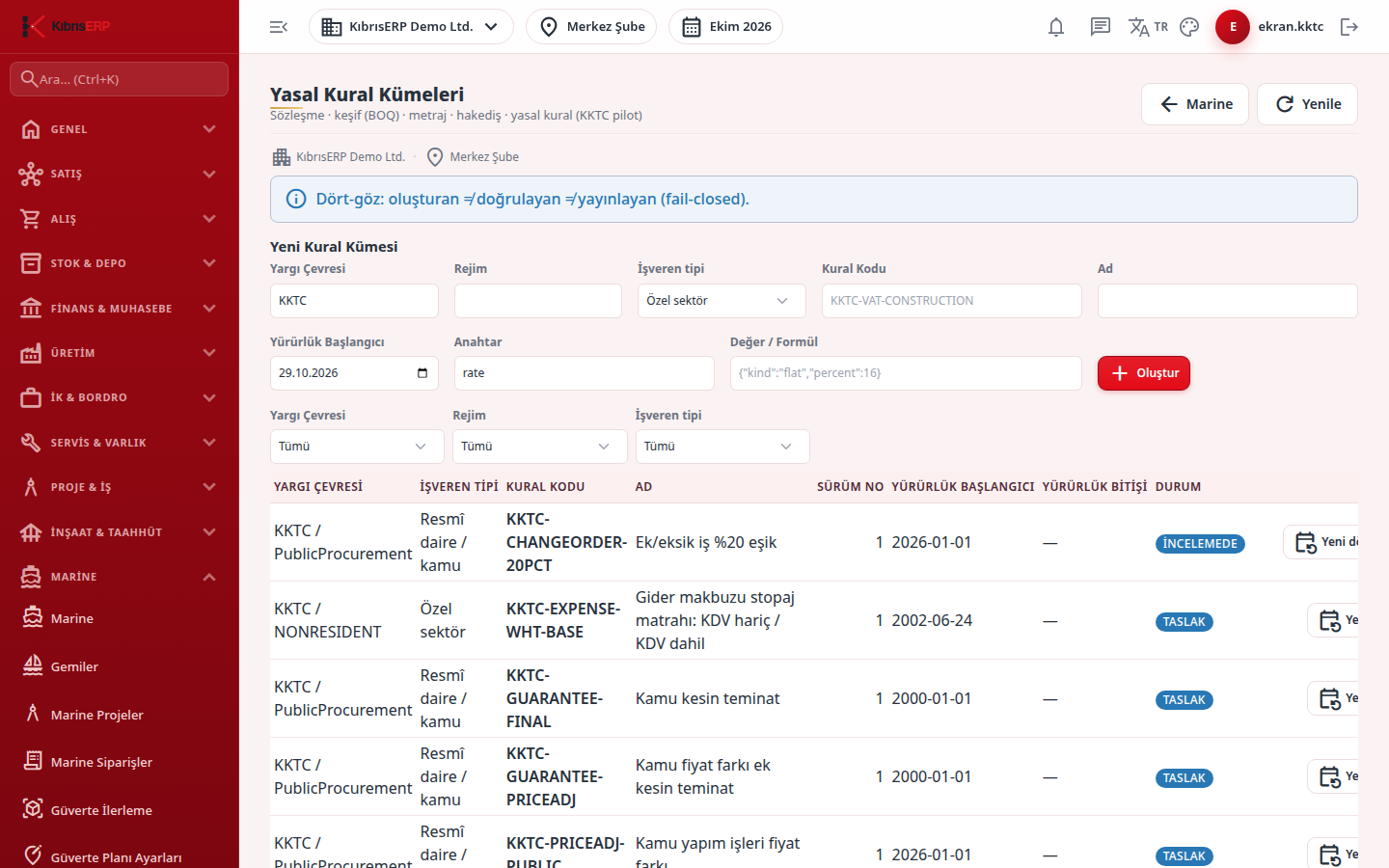
Section titled “What it is for”Legal Rule Sets holds the dated, sourced rule sets used to calculate the official components of a Marine claim (claim withholding, VAT, and the withholding base). Each rule set is born as a Draft, passes through In Review and Verified, and is used in claim calculation once it is Published. A published rule cannot be changed; a new version is created for a new period and the old rule is closed with Invalidate.
Every rule set carries an Employer type: Public body or Private sector. There is no “All” option; a rule valid for both is entered as a separate row for each. The claim matches the employer type exactly, and a private employer’s claim never uses a public body row. The employer type comes from the contract regime: a public tender regime looks for the Public body row, other regimes the Private sector row.
The same screen also opens from the Construction menu; when opened from the Marine menu the Marine permissions apply. If there is no Published rule in force on the claim’s calculation date, no official component is produced: the claim goes to legal review and cannot be approved financially (“A published rule for an official component is missing; the claim cannot be approved financially.”). The claim component keeps the identity of the rule set used, so publishing a new version later does not change a calculated component.
Awaiting value: a rule whose value is not yet known appears as a placeholder reading “Awaiting value”. It holds no value, cannot be published and does not enter calculation; when a claim reaches it, the claim stops and names the rule to be filled in.
In a North Cyprus branch the jurisdiction prefix is searched as KKTC (for example KKTC-WHT-SHIPBUILDING). In the product’s sample (demo) company some North Cyprus rows come ready as Published based on the official text; rows whose confirmation is not complete, such as the base model, come as Draft and the claim stops at that rule until you publish it through the four-eyes chain. Rules with no known official value stay as “Awaiting value” placeholders. In your own company these rows do not come with the installation; you create the rule sets yourself. For a foreign (non-resident) contractor the rule is read from the row whose Regime is NONRESIDENT; a row with an empty Regime covers the North Cyprus resident (local) contractor. On a payable (expense-side) claim it must be stated whether the contractor is local or foreign. Enter the rate and its source after confirming with the official source (rates are the dated rows on this screen, not written into the program).
Who uses it
Section titled “Who uses it”The finance/tax officer and an authorized manager. Permission is on the Marine claim legal rules (withholding/VAT) page of Settings › Roles (valid while the Marine package is open): Add / Edit creates a rule set and sends it for review; Approve verifies, publishes and invalidates. View alone performs no action. To see the screen, View on the Marine page or on this page is enough. The administrator has both write and approval permission.
Four-eyes applies: the person who verifies must differ from the creator, and the person who publishes must differ from both the creator and the verifier.
Screens
Section titled “Screens”- New Rule Set: jurisdiction, regime, employer type (the new form defaults to Private sector), rule code and effective start; with filters by jurisdiction, regime and employer type.
- Rule list: each rule set with status; click one to see its rows.
- Status buttons: Send for Review (a rule needs at least one row), Verify, Publish, Invalidate.
- Rule Rows table: effective dates and sources.
Typical workflow
Section titled “Typical workflow”- Create the rule set from the form (Draft) and send it for review.
- A second authorized user verifies it.
- A third user publishes it.
- For a new period, create a new rule set with the same rule code and a new effective start; invalidate the old one while it is published, then publish the new one.
Related modules
Section titled “Related modules”Step-by-step screen guides are currently available in Turkish; the links above open them.