

Parameter Center
What it is for
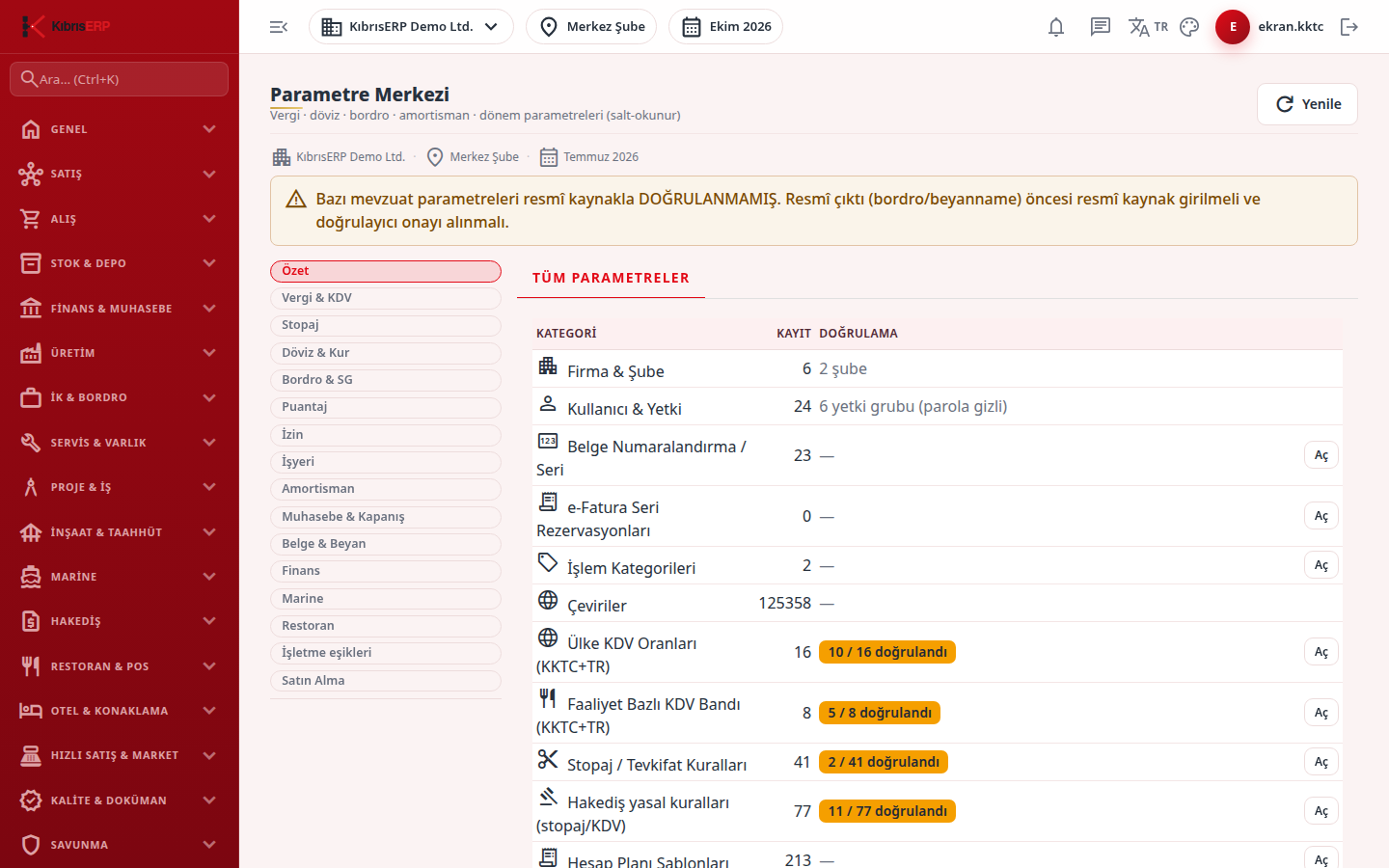
Section titled “What it is for”The Parameter Center (Parametre Merkezi; Settings › Parameters) is the single place that manages every rate, threshold, day/age limit, coefficient, cut-off date and rounding rule that KıbrısERP uses in its calculations. Areas such as tax, withholding, foreign exchange, payroll, timesheet, leave, depreciation, accounting closing, documents and business thresholds are presented as groups on the left, and tabs inside each group. Each tab is a table, and each row of the table is a value valid in a given date range.
The basic principles of parameters:
- Dated row: every value is stored with its validity start and end, its source (Official Gazette, law article, authority letter) and its verification status. No rate is built into the product.
- New period = new row: when legislation changes, the old row is not edited; a row with the new start date is added and the previously open row closes automatically.
- Four eyes: an added row is born unverified (Draft); when an authorized person other than the one who added it clicks Confirm, the row is used in official calculations.
- No value, no transaction: if there is no single verified row for the relevant date, the product does not use an invented value; it stops the transaction with a clear message. The messages are listed on each tab’s page.
- Stored at record time: calculated records such as documents, payroll and entries store the value they used when they are recorded; a new row added later does not recalculate an old record.
Who uses it
Section titled “Who uses it”The accounting officer, financial advisor, HR officer and managers. To open the screen you need View on the Settings or Settings - Parameters page in Roles (administrators always see it). To add a new period you need Add on the Settings - Parameters page, and to confirm Approve; the user who added a row cannot confirm the same row. Some tables come with the product (Origin: Platform seed); KıbrısERP updates them and company users read them.
Screens
Section titled “Screens”The tabs are grouped in the left navigation:
- Summary (Özet): All parameters.
- Tax & VAT (Vergi & KDV): VAT rates, Marine VAT exemptions, Marine special consumption tax, Ba/Bs threshold, VAT1 line mappings, VAT return type, filing deadlines.
- Withholding (Stopaj): withholding rates, shipyard withholding.
- FX & Rates (Döviz & Kur): tax rate policy, manual rate deviation thresholds, period-end FX valuation rules, company FX valuation policy.
- Payroll & Social Security (Bordro & SG): premium and tax rates, provident fund coverage dates, family allowances, employment rules, onboarding documents, severance, notice periods, collective dismissal, free zone payroll incentives, payroll filing and due rules.
- Timesheet (Puantaj), Leave (İzin), Workplace (İşyeri), Depreciation (Amortisman), Accounting & Closing (Muhasebe & Kapanış), Documents & Returns (Belge & Beyan), Finance (Finans), Marine, Restaurant (Restoran), Business thresholds (İşletme eşikleri) and Purchasing (Satın Alma).
Three kinds of tab exist: a dated row table (lists rows; New period adds a row and Confirm confirms it), a read-only list (a platform parameter or a record count; changes come with a release or are made on the screen the Open button opens), and a summary counter (record count and verification status; its note says management is not yet in this screen and is done from the related module screen).
Typical workflow
Section titled “Typical workflow”- Open Parameter Center from the Settings group and check the active company, branch and period at the top; a warning band appears if there are unverified legislation rows.
- Pick a group in the left navigation, then a tab.
- To add a value, press New period, choose the scope and the validity start (the form comes filled with the latest row’s values), correct the values, and enter the source.
- A different user with Approve permission presses Confirm on the row in the same tab. A confirmed row is used in calculations; an unconfirmed one is not.
- A wrongly entered row cannot be edited in place and rows are never deleted; enter a corrective new period row.
Related modules
Section titled “Related modules”Step-by-step screen guides are currently available in Turkish; the links above open them.