

Digital Archive
What it is for
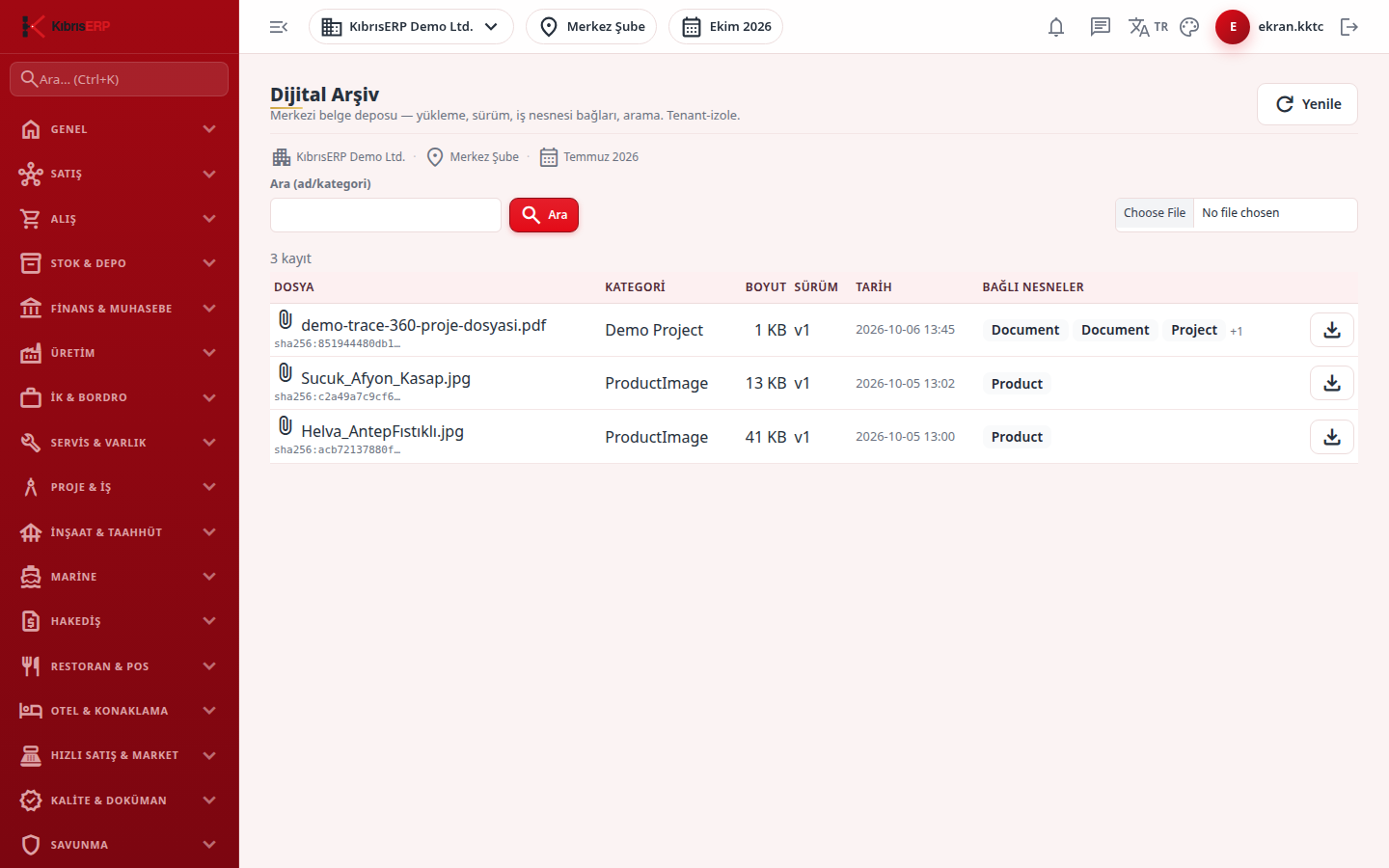
Section titled “What it is for”Digital Archive (Dijital Arşiv) is the central store for documents and attachments uploaded from all modules. You search by file name or category, upload new files, download them, and see each file’s version and the record types it is linked to. A content digest is shown on each row to prove file integrity, and versions are kept, never deleted. Files uploaded from the attachments panel of other modules also land here.
Who uses it
Section titled “Who uses it”Administrators see it in the menu; other users can open it with View permission on the Settings page. The list is limited to documents whose linked record is within your company and branch scope. Files of modules with their own access gate (for example quality inspection and defense compliance evidence) do not appear in the general search; they open only from the owning module.
Screens
Section titled “Screens”- Search (Ara (ad/kategori)): type a file name or category; Refresh (Yenile) reloads the list. The list shows at most 100 documents.
- Upload: pick a file with the file chooser; it is added under the General category and linked to the record.
- Document table: file, category, size, version (v1, v2…), date and linked objects (first three as badges, the rest as “+N”).
- Download: the icon at the end of each row.
Related modules
Section titled “Related modules”Step-by-step screen guides are currently available in Turkish; the links above open them.