

Legal Rule Sets
What it is for
Section titled “What it is for”The rate and calculation rule of the official components of a progress claim (VAT, income/corporate withholding, VAT withholding, price difference) are read from the rule sets on this screen; the product does not hold these values built in. Each rule set is tied to a jurisdiction, an employer type (Public body or Private sector) and a rule code, and carries an effective date, source and evidence. There is no “All” employer type: a rule valid for both employers is entered as a separate row for each. A claim takes the employer type from the contract regime and uses only that employer type’s row, never another employer’s or another country’s.
A rule set passes through Draft, In Review, Verified and Published; a version that is withdrawn becomes Invalidated. Only a Published row whose effective date covers the claim date is used in calculation. Published claims keep the rule they used in their record and are not recalculated when a rule later changes.
The same screen also opens in the Marine package, from the Marine menu; rule sets are at tenant level, not company level, and are shared between packages.
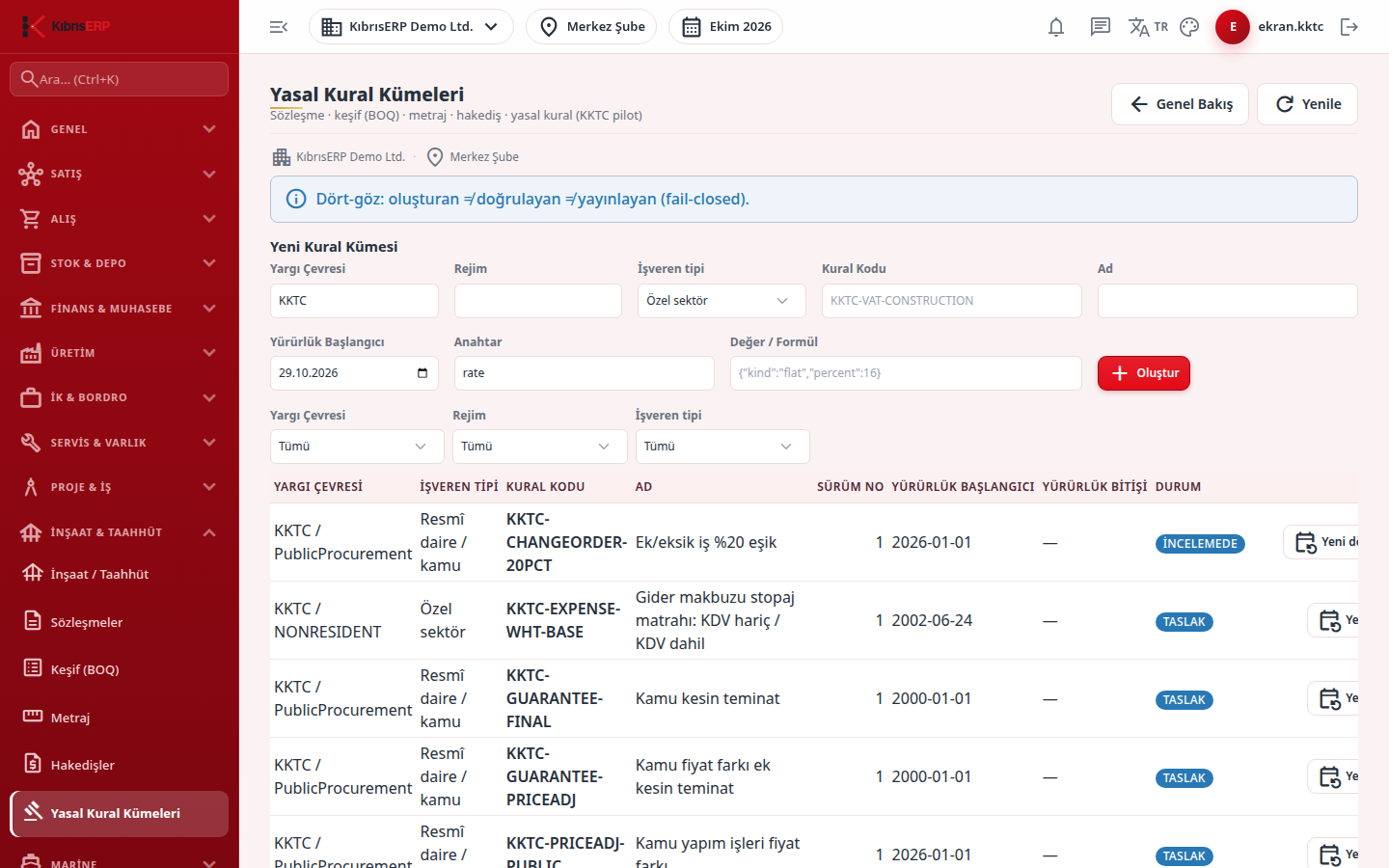
In the product’s sample (demo) company there are ready Draft rule sets for North Cyprus: construction VAT, income tax withholding on foreign contractor claims, public works price difference (formula and currency basket), additional/omitted work threshold, and claim stamp duty and retention rules. They are not published and produce no official output. Rules whose official source gives no value or start date stay as “Awaiting value” placeholders; each value is entered after source confirmation, through the four-eyes chain.
Who uses it
Section titled “Who uses it”A tax advisor or accounting officer prepares the rule, a separate authorized person verifies, and a third person publishes. Permission is separate from screen access: the Construction claim legal rules (withholding/VAT) page (for Marine, Marine claim legal rules (withholding/VAT)) is needed. Add or Edit prepares and sends for review; Approve verifies, publishes and invalidates. View alone opens none of these actions. The rule’s creator, verifier and publisher must be three different people; a button that breaks this is shown disabled with the reason on hover, and even an administrator cannot skip the rule.
Screens
Section titled “Screens”- New Rule Set: jurisdiction, optional regime, employer type, rule code, name and effective start.
- Rule list and filters: filter by jurisdiction, regime and employer type; the list shows employer type and effective end.
- Rule status buttons: Send for Review, Verify, Publish, Invalidate; a rule with no rows cannot be sent for review.
- New period (Yeni dönem): pre-fills the form from the selected rule and suggests a start date.
Typical workflow
Section titled “Typical workflow”- Open Legal Rules under Construction / Contracting and fill in New Rule Set.
- Send the draft for review.
- A different person verifies it.
- A third person publishes it.
- To change a published rule, open a new version, publish it the same way, and invalidate the old version.
Related modules
Section titled “Related modules”Step-by-step screen guides are currently available in Turkish; the links above open them.