

Bulk Permissions
What it is for
Section titled “What it is for”Bulk Permissions (Toplu Yetki) lets you give the same set of permissions to many selected users, or remove it from them, in one go. When a new module is opened or a team changes duties, you no longer have to open each user one by one.
Who uses it
Section titled “Who uses it”Administrators and users with View on the User Management page. The usual rules apply: you can only grant permissions you hold yourself, and you cannot change your own permissions or administrator accounts.
Screens
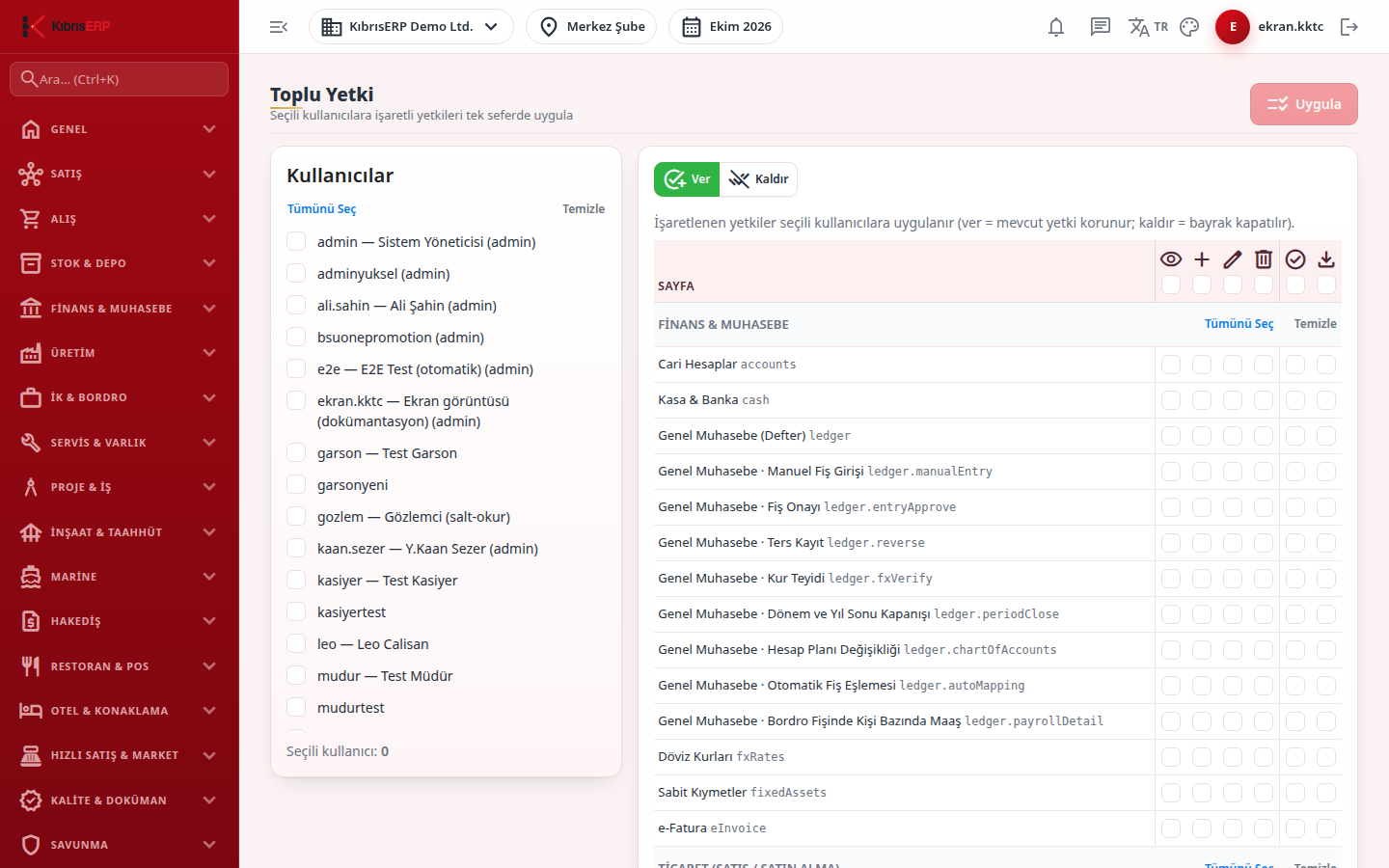
Section titled “Screens”- Users card (Kullanıcılar): tick the users to change; Select all and Clear work on the whole list and a counter shows how many are selected.
- Give / Remove mode (Ver / Kaldır): Give adds the ticked permissions and keeps existing ones; Remove switches them off.
- Permission matrix: tick View, Add, Edit, Delete, Approve and Export per page; module and column headers tick in bulk.
- Apply (Uygula): disabled until at least one user and one permission are selected.
Related modules
Section titled “Related modules”Step-by-step screen guides are currently available in Turkish; the links above open them.